Alternatives to PhotoShop

Photoshop is wonderful software and I have loved it for many years. I just recycled by floppies from the early version I bought for my MacSE when I moved last year. I really didn’t need them to prove anything to upgrade any longer since there’s no place to insert floppies any more. Upgrading from version to version, the price of the software does not slap you in the face like it does if you are buying it for the first time. For the kind of editing I do for my blog, there’s just no justification for spending that kind of money – particularly when there are so many alternatives that are free.

Applications you download

  • GIMP. GIMP is the granddaddy of the free alternatives. It’s open-source and the word GIMP stands for SNU Image Manipulation Program, it’s very name signaling its open-source street cred. It’s available for Windows, Linux and Mac. It has tons of bells and whistles and there are users who swear it’s even better than Photoshop. If you tried GIMP a few years back, its user-face is easier and more user-friendly than it used to be.
  • GimpPhoto: Based on GIMP with a more PhotoShop like user interface. For Windows and Linux.
  • Photoscape: This is a Windows only program. Sasy Scarborough at Sasypants.com swears by it and has done a great tutorial on using it, including a movie.
  • Paint.NET is another Windows only program. It was supposed to just be a replacement for MS Paint, but it’s grown beyond that old program into a decent photo editing application.
  • ChocoFlop: This is a Mac only program that takes advantage of Mac’s architecture to allow fast, non-destructive photo-editing. It’s no longer being updated and developed, but is still available and totally free.
  • Pixelmator: A super cheap ($14.99) alternative to PhotoShop for Macs only. Seriously, for $14.99 you get content-aware fill. What more can you ask for?
  • CinePaint: Actually it’s designed for making animated films, but has great image-editing capabilities and it’s free. Mac software.
  • Pixia and Phierha: For Windows users. Created to make anime/manga illustrations, it’s a powerful image editor. Phierha is an newer version of Pixia with more features and a redesigned interface.
  • Inkscape: Inkscape is more accurately an alternative to Illustrator, but has a lot of good tools for editing. For Linus, Windows and Mac.
  • PhotoPlus: has standard image editing tools plus drawing brushes. Windows only.
  • Mac Preview: Preview is not just for peeking at your photos before deciding which to keep and which to toss. You can crop, edit, add text and do manage basic photo-editing tasks with the free app that comes already loaded with your Mac.
  • PhotoFiltre: Windows only. If you want maximum flexibility to add lots of filters, this image-editing program is very focused on allowing you to add filters. There are more than 100 filters with this program.
  • ToyCamera AnalogColor: Even people with PhotoShop will want this little app though it’s not free. (¥1,050 or $13.35.) It’s super easy, full of effects and they work so fast that you can lose yourself in trying them out. For Mac and PC.

ToyCamera AnalogColor is well-named because it’s so much fun to play with it.


Web-based Editors

  • PicMonkey: Gidge and Gogo love this one.  It has an easy collage-making interface and tons of special effects you can use on your photos. PicMonkey is so free you don’t even have to give them your email address. No registration required!
  • Splashup: Integrates seamlessly with Picasa, Flickr, Facebook, Photobucket, SmugMug and their own photo-hosting at SplashUp. Lets you edit several photos at once and feels like an application.
  • Photoshop Express: Yes, an alternative to Photoshop is Photoshop! This is a web-based version of Photoshop with some useful tools like dodge and burn and fun effects like color pop that lets you make a black and white picture with one pop of color.
  • G-Plus Creative Kit: If you have G-Plus and upload your photos there, you can edit them using their creative kit. It’s super-easy and there are lots of fun effects and basic editing options. Making a duotone has never been easier.
  • Aviary – the new photo editor that directly links to Flickr. Works on your mobile phone and with Facebook. Very easy to use.
  • FotoFlexer: In addition to lots of retouching tools, effects and other basic tools, this lets you work with layers, curves and liquify. It also integrates with most common photo-hosting sites.
  • LunaPic: If you are in love with effects, this might be your favorite. Works with Facebook, Picasa, Flickr and Photobucket.
  • Photo-kako.com: The interface is a little confusing,  probably due to non-native English speakers doing the translation. However, there are so many toys to play with in adding fancy effects and filters to your photos, you won’t mind experimenting.
  • Pixlr.com: Super easy with fun effects that you can run through one after another. It’s also entertaining to use the Pixlr-Matic retro effects. The work window looks like a developer tray and when you move your cursor the developing fluid ripples under the cursor. Who knew editing could be such fun!
  • Big Huge Labs: Helping you do cool stuff with your digital photos since 2005. Make your own movie poster or magazine cover. Try out fun effects. It’s a great place to play.
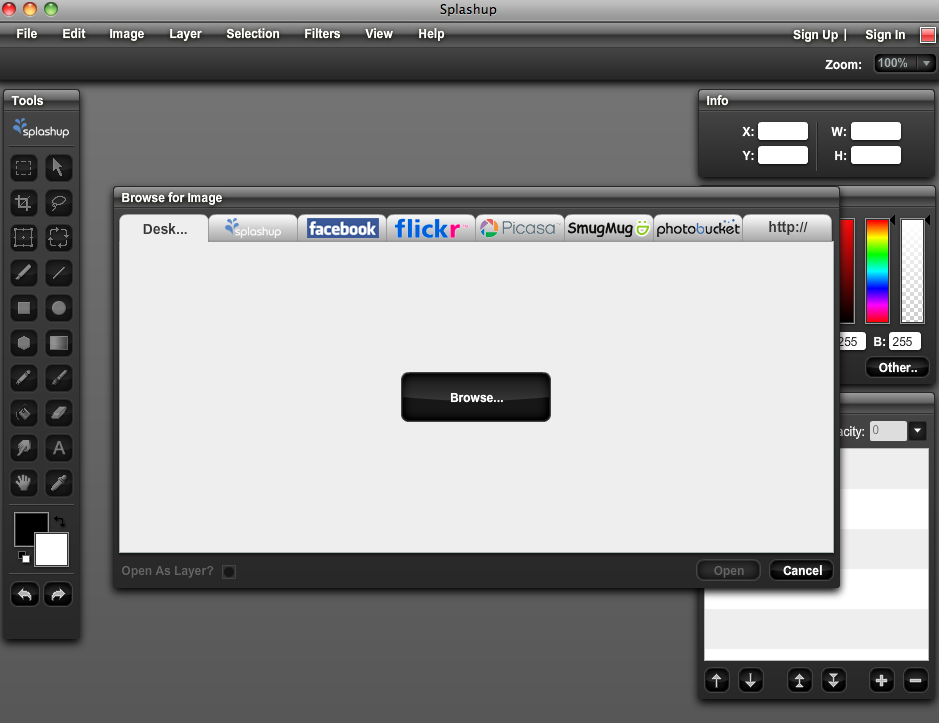
Splashup integrates seamlessly with many photo hosting sites.

This and other tutorials are all featured at the Blogger Carnival at SL9B. With tutorials from eight bloggers, the Blogger Carnival will have lots of tips and in-world sets for your to practice your new skills. It opens Monday, June 18th.  Blogger Carnival at SL9B

Updated to add Pixlr.com and Big Huge Labs.
Mirror, Mirror on the Floor: A Tutorial

SL9B

What with Snow White, Snow White and Snow White, it’s about time we had some mirrors in Second Life. It seemed a logical next step after the reflections in the previous tutorial, though I was more in the market for a homey little mirror rather than some grand baroque masterpiece with a talking head. Though, that makes me wonder if there were a talking head on a prim just under the water…

Continue reading →

Reflections of You: Tutorial

Way back in January, I saw a fantastic tutorial by Graphic Dix for Modavia Fashion Marketing on using Second Life’s water in an innovative way to capture reflections. We’ve all stood on the bank of a river or waded into the ocean and admired our reflections, but he took it to a new level.

SL9B

I wanted to do something similar and experimented a little bit and ended up going in a slightly different and, perhaps, easier direction, though achieving the same effect.  I began by finding a texture, in this case some mossy pavers from Zooboing Creations. I made a copy of the texture and using a big soft-edge eraser, I erased part of it, leaving it open alpha areas.

Continue reading →

You know what? You don’t have much time!

Hello, people, i hope everyone is doing good 🙂

There are a few events currently going on and for one of them you only have a few hours left to get nice items at discounted prices. I’m talking about the Fifty Linden Friday, which is back, and Collabor88.

So, let me show you what i liked the most in both the collections.

Snapshot_001

Snapshot_002

Continue reading →

Picking Your Pose – A Tutorial

It might seem intuitive that if you’re a blogger you know what you’re looking for in poses but I know as a new blogger, I certainly didn’t know.  So for part of our SL9B celebration, I’m offering up poses 101, what you’re looking for as a consumer.

I do make poses, and while I’ve been doing it almost two years I’m nowhere near a veteran. But for the sake of diplomacy, I’m only using poses I’ve made to demonstrate the good and the bad of static poses. Continue reading →

Narcissus With Red Lips – Another SL9B Preview

Narcissus in Red Lipstick

As Cajsa and I feverishly work on our SL9B exhibit, I took a break to snap another pic on our parcel because I just finished up my half of that work and was kind of excited.

I’m not going to spill the beans on our parcel’s theme but I think that the great big blogger family of SL will find it fun and interesting if nothing else.

The reason we have a parcel, is as Cajsa put it “Gidge had a whim.” That’s true. It was one of those messages I kept seeing on log in so HEY YAY FOR MARKETING I GUESS IT WORKED, and I was thinking, that’d be kinda cool, participate – be part of the community. In my mind, I had something very simple planned. I said “Hey CAJSA SIGN US UP.” And she did, we got accepted and she flailed “OMG NOW WHAT?” I had no idea.

Cajsa,  on the other hand does nothing half way, and what went from my whim has turned into a full on project that’s just amazing.

She’s lovely like that.

SL9B is coming……..

Pose – Status

mmmmm…luscious red lips

jun12_007

Red lipstick! Red lips are the ones the songs are written about. One of the great musicals of all time can be brought to mind with just a single image of red lips. They’re powerful, bold and iconic. And they’re not for everyone, except today. Today is Red Lip Wednesday. Hopefully lots of us bloggers will flash our ruby red lipstick today.

Of course, nothing suits every person. We have our likes and dislikes. There are fashions I dislike and fads that leave me confounded and confused and asking why? Mostly though I shrug my shoulders and think to each his own. Certainly if we all looked the same and liked the same things, the world would be a much more boring place. So, let’s hear it for red lips! Here, there and everywhere.

jun12_011

I tossed this outfit together pretty quickly after shooting the wedding dress on Monday just before my set at The Velvet. There was no way I was dj’ing in a wedding dress! I remembered the gorgeous skirts from NYU for faMESHed. There were several colors and I loved them, so I pulled out another color. I dug around in my system clothing for something to wear with it and found this old top from Kunglers.

Continue reading →

June

WTG

When I saw the new group gift from WTG celebrating their 3rd year, I knew it was time to check out the MiaMai Wedding Gown Collection to find one I could wear with it. There were so many to choose from and Monica also made the gowns in many colors, recognizing that modern brides are open to variety and individuality in color. However, I went with the traditional white in order to incorporate the jewelry. By the way, if you want a peek at some of the rest of the Bridal Collection, there’s a few great posts already: from Grazia Horwitz. Vaki Zenovka and of course, on the MiaMai store blog.

Continue reading →

Perhaps, Perhaps, Perhaps…

Rather than being responsible and working on my stuff for SL9B last night, I popped over to the Velvet to dance while Cajsa DJd. After about the third awesome and kind of random tune, I asked her what the theme was – joking “Just stuff I like?”

She said “yes that’s the theme, I couldn’t come up with one and as I flailed I decided to just make it stuff I like.” Continue reading →

Peeking Around the Corner

Peeking

I took a peek around at some of the builds rising up around where we are working on It’s Only Fashion’s SL9B exhibit and am so impressed. A favorite among my neighbors is a beautiful woodland scene. I don’t know if it’s finished since it’s pure scenery now, but it’s so lovely. If even one-fourth of the exhibits are this beautiful, you would be well-advised to visit SL9B and explore. For my exploration I put together a top from E! and a skirt from Tee*fy. The top has delicious eyelet detailing that gives it a romantic femininity. The skater skirt from Tee*fy is a lovely romantic floral, though the skirt is also made in many other prints – including some very mod prints.

Peeking

Notice that the skirt is lined on the inside. If it were left alpha as many mesh skirts are, I could not have shot this picture – and I really wanted to capture the feeling of this place.

Continue reading →