Category Archives: Features

Making Your Own Child's AO

[youtube=http://www.youtube.com/watch?v=bebU19ePujU]

Gidge’s SL daughter, Hatchy Mills, made an adorable child’s Animation Override at a very low cost. With the popularity of children’s avatars growing, there is a need for children’s AO that produce the naive, unaffected and innocent movements and stances of children.  While a child at Hogwarts would need something more sedate than this one, there’s nothing to stop you from making your own AO at little cost.

Continue reading →

Lighting, Shadows and Projectors, Oh My!

So, now that my preferences are set and I have fine-tuned my windlight settings, I can finally take a picture! Whew! But wait, my necklace is missing pieces and my feet show through my shoes. I even have some bald patches! And after all that work!

Never fear! Debug is here!

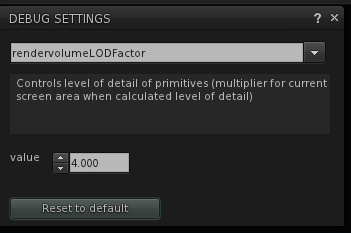
Open Debug Settings from the Advanced Menu and type in rendervolumeLODFactor. It will autocomplete by the time you type L which stands for LOD which stands for Level of Detail. You want this set at 4 or higher. I find that 4 is high enough for everything I am wearing, but I suppose if I wanted to see the hazelnut in the raven’s claws 75 meters overhead, I might want to crank it up higher.

Continue reading →

SL Weekly Words Challenge: Play Time

This weeks word is PLAY TIME.

The SL Weekly Words Challenge is a blogger challenge that everyone is invited to participate in.  Each week there is a word, and you are invited to interpret that word with a picture. If you participate, be sure to add your pic to the group and link back here. I love seeing how everyone interprets the words.

Pics don’t have to be complicated or SRSS BSNSS. Have fun. Can’t wait to see what you do with it!

Next Week’s Word: Elevate

Where Did They Hide My Windlight?

Those of us who have installed Second Life viewer updates recently have all had a moment when we said “Gack! Where’s my windlight? What have they done!!!” Actually, I am sure most of us had more profane things to say as we struggled to understand this new interface. My first reaction was totally negative. I have found a couple silver linings, though, to the grey cloud that is the new interface and struggled through. I am sure that other folks who are also exploring the new interface has even more ideas of how to use it more easily and hope everyone can share their tips, because the new interface has confounded some folks. As I get more comfortable with it, there are some things I value.

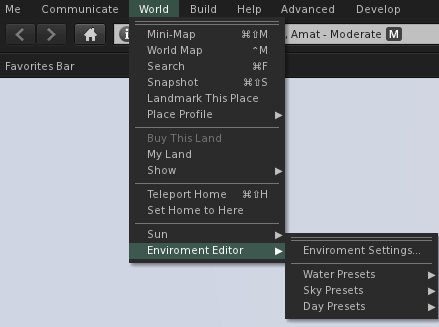
The Environment Editor is in the same place as ever, though we have faster access to the different components of the editor than before. They have also given us some additional day presets so we can choose our Second Life environment and still have it cycle through day and night. This will be a great benefit to role-playing sims and other sims that want a day and night cycle, but want a different environment than the default we are all used to.

Ambitious people can create their own Day Cycle or Fixed Sky settings and make them the default for their region, giving people a much stronger level of control over how people experience their sims. We used to get notecards at a sim with a suggested windlight setting we could replicate if we weren’t too lazy. Then we could get notecards in some viewers that we could click on to import a setting or get a link to a preset we could download and install, if we weren’t too lazy. Now, all we have to do is got there and unless we override the region’s lighting with our own, we will see what they want us to see. That’s a bonus.

Continue reading →

The All-In-One Set Up Tip Sheet

For some reason the regular Second Life viewer decided that I could only log into the beta grids. I tried all sorts of things to convince it that I wanted to go elsewhere, but it ignored me and kept defaulting back to the beta grid. Eventually I manual deleted all my App Settings folders for Second Life, deleting the cache, preference, everything. Since I had to reset my preferences anyway, I thought I might give you a walk-through of how I set up my computer to shoot photos.

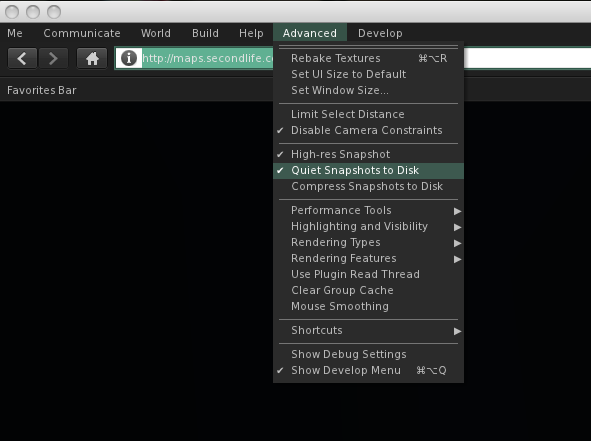
First I press CTL-OPT-D to open the Advanced Menu.  I want to be able to cam all over with my camera so Deselect Limit Select Distance. This not only lets me edit things far away, but I can also option-click on them to bring them into the exact center of the picture. Then I Disable Camera Constraints so I can move my camera vision all over, far away or close up. I select High-Res Photos because it doubles the pixel count of the pictures you save.  I also select Quiet Snapshots to Disc so that I don’t get the click sound and also so I don’t make a cheesy smile in every picture. I also enable the Show Development Menu for some things later one.

(Handy Tip #1: See that Rendering Types Menu. Remember that! If you are editing a prim and it runs away from you and gets buried in a mountain or if you move your pose stand and accidentally lower it into the ground you can go there and rescue your lost and buried items. Just deselect Surface Patch and the ground disappears and there your things are.)
  Continue reading →

SL Weekly Words Challenge Week 4: JOY

The word for this weeks SL Weekly Words Challenge this week is JOY.

Any world where I can wear a party dress and be bombarded by blue and yellow bubbles, is a world which brings me JOY.

The SL Weekly Words Challenge is a blogger challenge that everyone is invited to participate in.  Each week there is a word, and you are invited to interpret that word with a picture. If you participate, be sure to add your pic to the group and link back here. I love seeing how everyone interprets the words.

Pics don’t have to be complicated or SRSS BSNSS. Have fun. Can’t wait to see what you do with it!

Next Week’s Words: Play Time


SL Weekly Words Challenge Week 3: Deliberate

Deliberate : intransitive verb To think about or discuss issues and decisions carefully.

transitive verb To think about “deliberately” and often with formal discussion

What does it mean to you?

Next week’s word: JOY

**the SL Weekly Words Challenge is open to all bloggers. It’s a platform for creative expression based on one word that is listed each week on this blog. If you participate please link back in comments, we LOVE to see what you guys have come up with for you interpretation of the word.

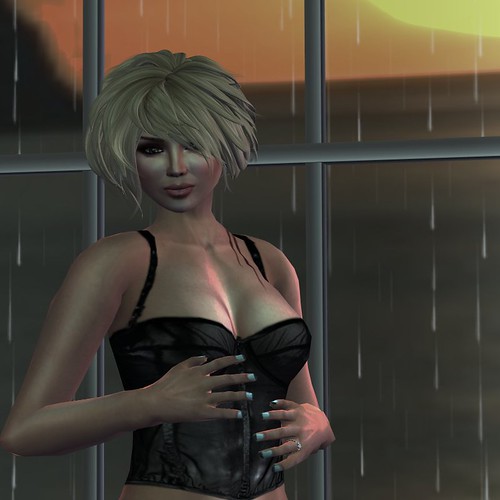
OH – and the bustier – is the PXL CREATIONS hunt item for the Platinum Hunt-  DOUBLE DUTY POST!

SL Weekly Words Challenge Week 2: Wants and Needs

Thanks to Elusyve for posing with me. 🙂

The SL Weekly Words Challenge is a blogger challenge where I suggest two words each week and bloggers are encouraged to portray those words with an image. New or old, it doesn’t matter. What matters most is expressing yourself creatively and having fun.

One person’s happy words might be another persons sorrow. Sharing what they meant to you in a picture is wonderous to me and I can’t wait to see what you guys do this week.

For Wants and Needs I chose an image of comfort with one of my best friends, Elusyve. When I’m sad and shaken she soothes me. She makes me laugh and I can truly say she gets me.

I’m lucky, that my wants and needs often coincide in one place, love and friendship.

Next weeks word: Deliberate

Oh and if you are interested – this is the link to the FLICKR group for the Challenge!

Hobo'n It Up @ the Yard

I found this cute little shop called BoHo HoBo and thought it would have something PERFECT for the Posse to wear this week, and guess what? I was right! Check out these awesome dresses and long coats.
JY Blues 8 6 11 3
We’ve each paired them with a cute hat and a pair of boots.
JY Blues 8 6 11 2
But the real fun of this is the blast we are all having at the Junkyard listening to the sexy voice of Miss Luci in between the GREAT Blues she spins for us on this Saturday night!
JY Blues 8 6 11 1
Join us at Junkyard Blues weekly (Saturday Nights 6-9 pm SLT) for Blues, debauchery and fashion.